Rate Change Report
The Rate Change Report allows users to track the reservations for which the rate plan was changed, or the rate amount was modified. Only the reservations for which the rate plan or the nightly room rate was modified for at least one night of stay are tracked in this report. Users can generate this report for a maximum date range of 90 days. The report can be filtered based on the following columns:
-
Confirmation Number
-
Last Name
-
First Name
-
Player ID
-
Arrival Date
-
Departure Date
-
Room Number
-
Room Type
-
Building
-
Status
-
Company
-
Group
-
Group Code
-
Old Rate Plan
-
New Rate Plan
-
Creation Date
-
Modification Date
Users can compare the values used at the time of booking the reservation and the values that exist after the reservation is modified.
Perform the following steps to generate the report:
Navigate to Reports ➜ Dynamic Reports ➜ Revenue/Forecasting ➜ Rate Change Report
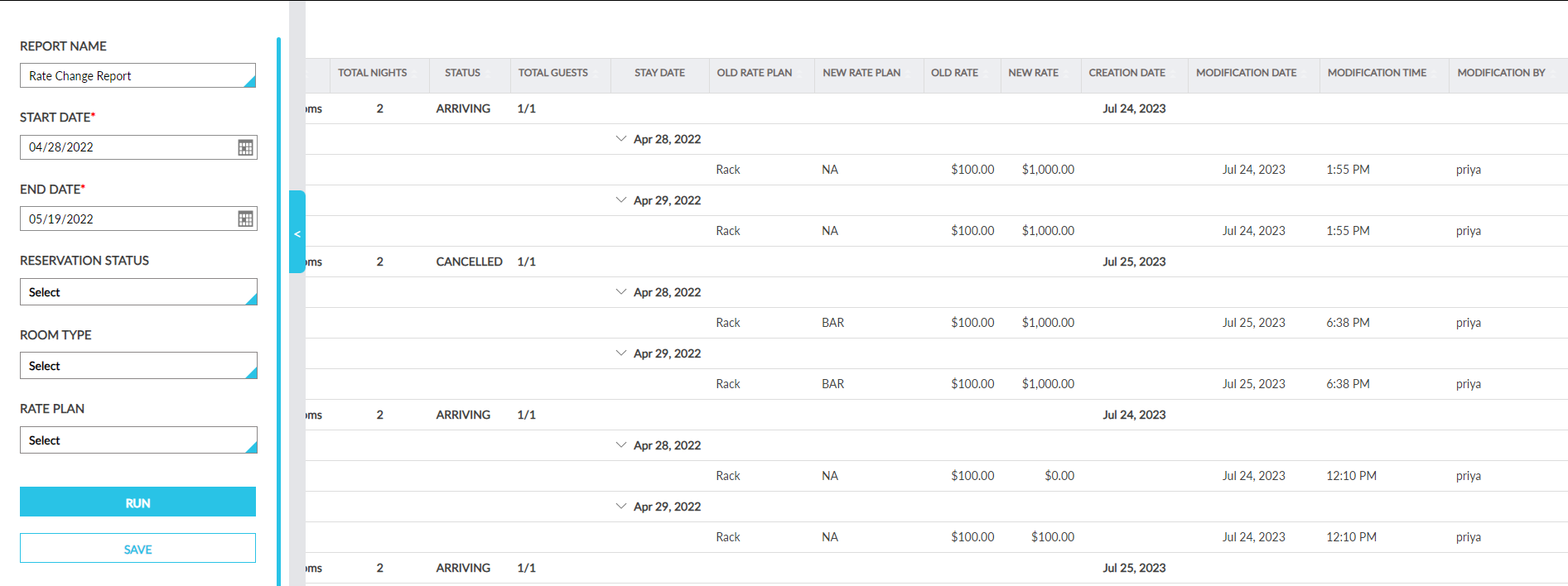
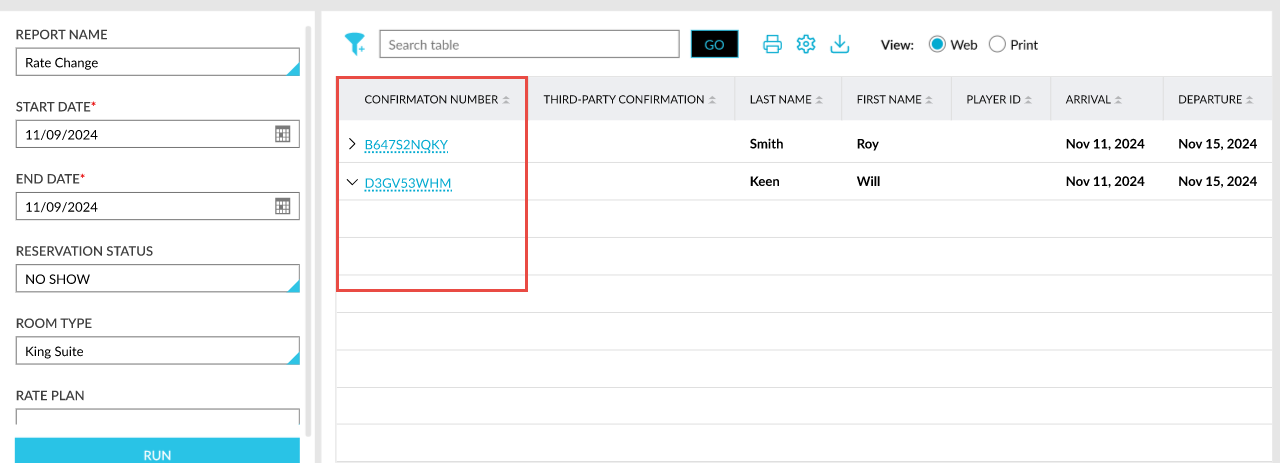
Refer to the following table and fill in the fields.
|
Field |
Description |
|---|---|
|
Report Name |
Rate Change Report. |
|
Start Date |
The start date from which the report should be generated. Displays the current property date by default. |
|
End Date |
The end date up to which the report must be generated. Displays the current property date by default. |
|
Reservation Status |
This is a non-mandatory multi-select drop-down list that allows users to select from the following reservation statuses:
|
|
Room Type |
This is a non-mandatory multi-select drop-down list that allows users to select from the room types configured at the property. |
|
Rate Plan |
This is a non-mandatory multi-select drop-down list that allows users to select from the rate plans configured at the property. |
|
Group By |
Users can select from the following options:
|
Click Run to generate the report.
Click Save to save the report under User Favorites section.
Sample Report - Group By - Date
Group By - Confirmation
Report Fields
This report displays the following fields:
|
Field |
Description |
|---|---|
|
Confirmation Number |
Displays the confirmation ID of the reservations. |
|
Last Name |
Displays the guest’s last name. |
|
First Name |
Displays the guest’s first name. |
|
Third-Party Confirmation |
The third-party confirmation number for the reservation if applicable. |
|
Player ID |
Displays the player ID of the casino players used for booking the reservation. |
|
Arrival |
Displays the arrival date of the reservation. |
|
Departure |
Displays the departure date of the reservation. |
|
Room Number |
Displays the room number assigned to the reservation. |
|
Room Type |
Displays the room type of the room assigned to the reservation. |
|
Building |
Displays the name of the building in which the assigned room is located. |
|
Total Nights |
Displays the total stay nights of the reservation. |
|
Status |
Displays the status of the reservation. |
|
Company |
Displays the company name associated with the reservation. |
|
Group |
Displays the group name associated with the reservation. |
|
Group Code |
Displays the code of the group associated with the reservation. |
|
Total Guests |
Displays the total number of guests included in a reservation based on the age categories configured at the property. |
|
Stay Date |
Displays the date for each night of stay for the reservation. |
|
Old Rate Plan |
Displays the name of the rate plan that was initially used for creating the reservation. |
|
New Rate Plan |
|
|
Old Rate |
Displays the initial rate with which the reservation was created. |
|
New Rate |
|
|
Creation Date |
Displays the reservation creation date. |
|
Modification Date |
Displays the date when the reservation was modified. |
|
Modification Time |
Displays the time when the reservation was modified. |
|
Modified By |
The user ID of the user who performed the modification. |
|
Rate Change |
Displays the following indicators:
This column can be sorted. Users can search and filter records using the rate change indicators. |
|
Variance |
The difference between the original and current rates for each date. |
|
Variance Total by Day |
The total variance calculated for each day. |
|
Reason |
The override reason selected when overriding the room rate. This column can be sorted. Users can filter records using this value. |
|
Comment |
The comment entered when overriding the room rate. |